Thursday, 14 May 2026

Getting Started with SWASHES (Shallow Water Analytic Solutions for Hydraulic and Environmental Studies)

What is SWASHES? (Claude)

SWASHES (Shallow Water Analytic Solutions for Hydraulic and Environmental Studies) is a software library and database of analytic (exact) solutions to the shallow water equations (Saint-Venant equations).

It was developed and released by researchers at INRAE (formerly IRSTEA) in France, led primarily by Olivier Delestre and his group.

Official website
https://www.idpoisson.fr/swashes/
(hosted by Institut Denis Poisson, Université d'Orléans)


Background and Purpose

The shallow water equations are the fundamental governing equations used to simulate a wide range of hydraulic and environmental phenomena, including floods, tsunamis, dam-break floods, and river flows. Verification of numerical solvers requires analytic solutions that can be compared against numerical results, but these solutions were previously scattered across the literature. SWASHES was created to consolidate, implement, and distribute them in a single, unified resource.


Main Contents

The analytic solutions included are broadly classified into the following categories:

  • Dam-break problems: dry bed, wet bed, 1D and 2D
  • Steady-flow problems: hydraulic jumps in channels, flow over bed steps, etc.
  • Unsteady problems: Thacker solution (oscillating water surface over a parabolic basin), etc.
  • Cases with and without friction: solutions accounting for bed friction such as Manning's law are included
  • Rainfall-runoff problems: analytic solutions for surface flow driven by rainfall

Features

※ Some models are not included in the paper above and require consultation of individual publications.


Use Cases

  • Accuracy verification of new numerical schemes (finite volume methods, discontinuous Galerkin methods, etc.)
  • Validation of well-balanced schemes (testing the balance between bed slope and friction terms)
  • Promoting understanding of the shallow water equations for educational and research purposes

SWASHES is widely referenced as a standard benchmark suite in the field of hydraulic numerical computation and plays an important role in assessing the reliability of numerical models.

Setting Up SWASHES

We set up SWASHES using the Python package described above.

The Python environment can be built with Conda using the following command:

conda create -n pyswashes -c conda-forge jupyterlab matplotlib swashes

List of Analytic Solutions in SWASHES

We refer to the latest documentation v1.05.00 (2025-04-22).

To download:

An overview of the analytic solutions included in the latest version is as follows:

  • 1D: types 0–9 (inclined plane, bumps, MacDonald, dam break, oscillations, bedload, sluice gates, dam break with step, solute model, mobile rain)
  • Pseudo-2D (1.5): MacDonald-type rectangular and trapezoidal channels
  • 2D: oscillations, 2D dam, spherical geometry

Details of each analytic solution are shown in the table below.
(Compiled from the manual, though some entries may contain errors.)

Dim. Type Domain choice Description
DIMENSION = 1 (One-dimensional)
1 type 0
Inclined plane
domain 1  L=10 m 1 Supercritical flow
domain 2  L=20 m 1 Transient solution
2 Periodic wave
1 type 1
Bumps
domain 1  L=25 m 1 Subcritical flow
2Transcritical flow without shock
3Transcritical flow with shock
4Lake at rest, immersed bump
5Lake at rest, emerged bump
1 type 2
MacDonald
domain 1  L=1000 m
(long channel)
1Subcritical flow — Darcy-Weisbach
2Subcritical flow — Manning
3Supercritical flow — Darcy-Weisbach
4Supercritical flow — Manning
5Sub- to supercritical flow — Darcy-Weisbach
6Sub- to supercritical flow — Manning
7Super- to subcritical flow — Darcy-Weisbach
8Super- to subcritical flow — Manning
domain 2  L=100 m
(short channel)
2Smooth transition / shock — Manning
4Supercritical flow — Manning
6Sub- to supercritical flow — Manning
domain 3  L=5000 m
(undulating channel)
2Subcritical flow — Manning
domain 4  L=1000 m
(with rainfall)
1Subcritical flow — Darcy-Weisbach
2Subcritical flow — Manning
3Supercritical flow — Darcy-Weisbach
4Supercritical flow — Manning
1 type 2
MacDonald
domain 5  L=1000 m
(with diffusion)
1Subcritical flow
2Supercritical flow
1 type 3
Dam breaks
domain 1  L=10 m 1Wet bed, no friction — Stoker solution
2Dry bed, no friction — Ritter solution
3Dry bed, with friction — Dressler solution
domain 2  L=20 m 1Self-similar solution, flat bed, laminar friction
2Self-similar solution, inclined bed, laminar friction
1 type 4
Oscillations
domain 1  L=4 m 1Planar surface in parabola, no friction — Thacker solution
domain 2  L=10000 m 1Planar surface in parabola, linear friction — Sampson solution
1 type 5
Bedload / Exner
domain 1  L=15 m 1Grass formula
2Meyer-Peter & Müller formula
1 type 6
Sluice gates
domain 1  L=10 m 1Gate opening onto dry bed
2Wet bed, free flow, low h_right (= 0.01 × gate size)
3Wet bed, free flow, h_right = gate size
1 type 7
Dam break with step
domain 1  L=20 m 1Dam break over discontinuous topography
1 type 8
Solute model
domain 1  L=1000 m 1No decay, initial solute concentration
2No decay, boundary solute concentration
3With decay, initial solute concentration
4With decay, boundary solute concentration
1 type 9
Mobile rain
domain 1  L=18000 m 1Rain moving at the same speed as the flow
2Rain moving slower than the flow
3Rain moving faster than the flow
DIMENSION = 1.5 (Pseudo-2D)
1.5 type 1
MacDonald pseudo-2D
domain 1
Rectangular short channel B1
L=200 m
1Subcritical flow
2Supercritical flow
3Smooth transition
4Hydraulic jump
domain 2
Trapezoidal long channel B2
L=400 m
1Subcritical flow
2Smooth transition / hydraulic jump
DIMENSION = 2 (Two-dimensional)
2 type 1
Oscillations
domain 1  L=l=4 m 1Rotationally symmetric paraboloid — Thacker solution
2Planar surface in paraboloid — Thacker solution
2 type 2
Dam in 2D
domain 1  L=25 m, l=10 m
(≥50 points recommended)
1Parabolic-shaped dam
domain 2  L=10 m, l=10 m
(≥20 points recommended)
1Cross-shaped dam with central ring
2 type 3
Spherical geometry
domain 1  α=0 rad 1Global steady nonlinear zonal geostrophic flow
domain 2  α=0.406 rad 1Global steady nonlinear zonal geostrophic flow

Running SWASHES

Overview of Arguments

As shown in the table above, most computational conditions for each analytic solution in SWASHES are fixed and cannot be changed. The only parameter the user can modify is the number of spatial divisions (1D: Nx; 2D: Nx, Ny).

At runtime, the conditions from the table above are passed as arguments. Five or six arguments are required:

  • arg1: Dimension
    • 1: One-dimensional (linear flow)
    • 2: Two-dimensional (full planar flow)
    • 1.5: Pseudo-2D (MacDonald's method)
  • arg2: Type
  • arg3: Domain
  • arg4: Choice (computational condition)
  • arg5, 6: Number of cells
    • For 2D cases, also include the number of cells in the y-direction.

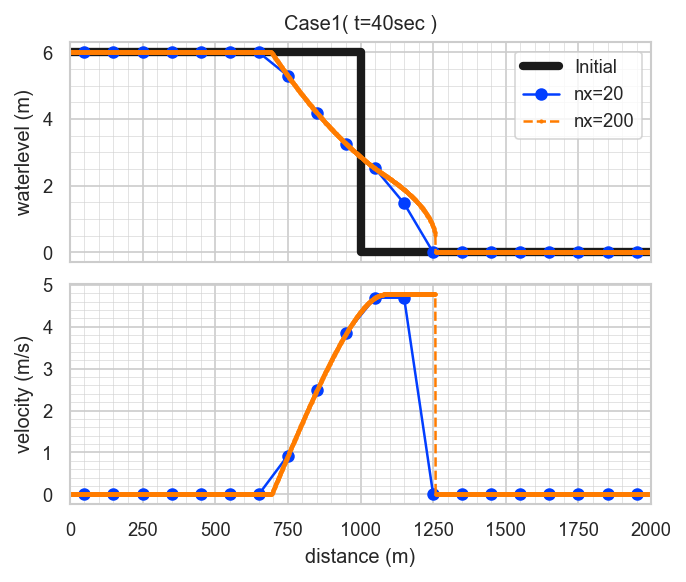
Sample Case 1: "Dressler's dam break with friction"

This is a 1D dam-break problem using the Dressler solution with friction.

The following computational conditions:

  • Domain length: L = 2000 m
  • Initial water depth: hl = 6 m
  • Dam location: x0 = 1000 m
  • Chézy coefficient: C = 40 m^(1/2)/s
  • Simulation time: T = 40 s

are fixed default values and cannot be changed. Only the number of spatial divisions can be modified.

The model arguments, referring to the table above, are as follows:

  • arg1: Dimension = 1
  • arg2: Type = 3 (dam break)
  • arg3: Domain = 1 (L=2000m) ※ The manual contains an error here.
  • arg4: Choice = 3 (Dressler solution)
  • arg5: Number of cells = 20 and 200 (two cases)

The execution commands are as follows:

swashes 1 3 1 3 20 > sol11.dat
swashes 1 3 1 3 200 > sol12.dat

The results, when plotted, look like this:

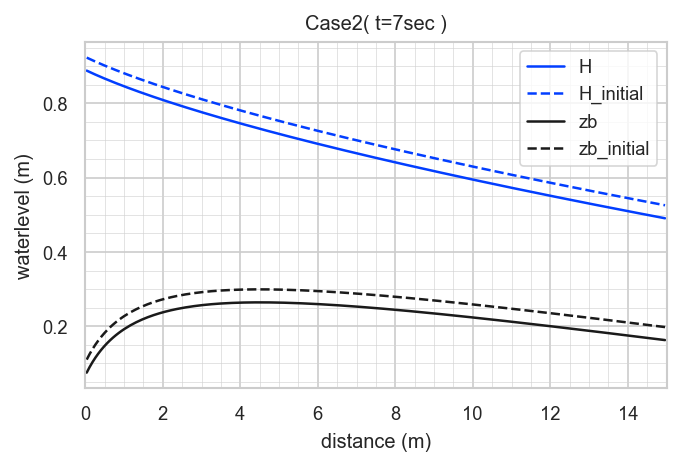
Sample Case 2: "Bedload (Exner) Meyer-Peter & Müller eq."

This case is a bedload transport model accounting for bed variation, using the Meyer-Peter & Müller formula.

The mathematical derivation is highly complex; please refer to:
Berthon et al. (2012), "An analytical solution of the shallow water system coupled to the Exner equation", Comptes Rendus Mathématique, vol. 350, no. 3–4, pp. 183–186.

and the SWASHES documentation on bedload solutions: https://sourcesup.renater.fr/docman/view.php/876/21533

The main computational conditions are as follows:

  • Domain length: L = 15 m
  • Unit discharge: q = 1 m^2/s
  • Simulation time: T = 7 s

These are fixed default values and cannot be changed. Many other parameters are also included, and none of them can be modified. Only the number of spatial divisions can be changed.

The model arguments, referring to the table above, are as follows:

  • arg1: Dimension = 1
  • arg2: Type = 5 (Bedload (Exner))
  • arg3: Domain = 1
  • arg4: Choice = 2 (Meyer-Peter & Müller eq.)
  • arg5: Number of cells = 200

The execution command is as follows:

swashes 1 5 1 2 200 > sol22.dat

The results, when plotted, look like this:

Summary

  • The library includes some lesser-known analytic solutions, which I personally found very educational.
  • The inability to modify detailed computational conditions is a drawback, but the ease with which analytic solutions can be obtained is a significant advantage.
  • The computational formulas for each analytic solution are organized in the documentation, making it a useful reference when implementing your own models.

GitHub

https://github.com/computational-sediment-hyd/howtouseSWASHES

Tuesday, 12 August 2025

Solution to VBA ThisWorkbook.Path and ActiveWorkbook.Path commands not working properly in Excel on OneDrive (as of December 2024)

Introduction

This is a well-known issue among VBA users:
When synchronizing on OneDrive, which is widely used by Microsoft users, Excel VBA's ThisWorkbook.Path and ActiveWorkbook.Path do not work as expected.

I found a good solution, so I will share it here.

Problem

Let me summarize the issue.

It's a bit troublesome.
Is Microsoft abandoning VBA and moving to Office Scripts or Python...?

Solution

Many websites have proposed solutions to this problem.

The best method is to use the following code.
The standard module file (funcOneDrive.bas) can be downloaded here, and the Excel file is available here.

Public Function OneDrivePath(S_Url As String) As String

    Const Cns_OneDriveCommercialPattern As String = "my.sharepoint.com"
    ' Right-hand value for Like operator to determine if the URL is for OneDrive for Business

    Dim S_pathSeparator As String
    Dim S_OneDriveCommercialPath As String
    Dim S_OneDriveConsumerPath As String

    Dim S_PathPosition As Long

    'If the argument is not a URL, assume it is a local path and return it as is.
    If Not (S_Url Like "https://*") Then
        OneDrivePath = S_Url
        Exit Function
    End If

    S_pathSeparator = Application.PathSeparator

    'Path for OneDrive for Business (Commercial)
    S_OneDriveCommercialPath = Environ("OneDriveCommercial")
    If (S_OneDriveCommercialPath = "") Then
        S_OneDriveCommercialPath = Environ("OneDrive")
    End If

    ' Path for personal OneDrive
    S_OneDriveConsumerPath = Environ("OneDriveConsumer")
    If (S_OneDriveConsumerPath = "") Then
        S_OneDriveConsumerPath = Environ("OneDrive")
    End If

    ' For business OneDrive: S_Url = "https://[company]-my.sharepoint.com/personal/[username]_domain_com/Documents/[filepath]"
    If (S_Url Like "*" & Cns_OneDriveCommercialPattern & "*") Then

        S_PathPosition = InStr(1, S_Url, "/Documents") + 10                         '10 = Len("/Documents")
        OneDrivePath = S_OneDriveCommercialPath & Replace(Mid(S_Url, S_PathPosition), "/", S_pathSeparator)

    ' For personal OneDrive: S_Url = "https://d.docs.live.net/[CID_number]/[file_path]"
    Else
        '********************************************************************************
        '         1         2         3         4         5         6         7         8
        '12345678901234567890123456789012345678901234567890123456789012345678901234567890
        'https://d.docs.live.net/f53c0b88b096e170/desktop/Excel_Ichiran_Ver3.4
        '********************************************************************************

        S_PathPosition = InStr(9, S_Url, "/")                                       '9 = Len("https://") + 1
        S_PathPosition = InStr(S_PathPosition + 1, S_Url, "/")
        OneDrivePath = S_OneDriveConsumerPath & Replace(Mid(S_Url, S_PathPosition), "/", S_pathSeparator)

    End If

End Function

When referencing files on OneDrive, the usual ThisWorkbook.Path and ActiveWorkbook.Path commands:

Debug.Print ThisWorkbook.Path
Debug.Print ActiveWorkbook.Path

return a URL (https://company-my.sharepoint.com/personal/username_domain_com/Documents/filepath), but using the defined function:

Debug.Print OneDrivePath(ThisWorkbook.Path)
Debug.Print OneDrivePath(ActiveWorkbook.Path)

returns the file path (e.g., C:\Users\username\OneDrive - company), allowing file access within your program.

Supplement: How to get the OneDrive path

OneDriveCommercial Root path of the OneDrive folder for organization accounts
OneDriveConsumer Root path of the OneDrive folder for personal accounts
OneDrive Same as OneDriveCommercial

It's a bit confusing, perhaps because you can use both organization and personal accounts.

Other reference sites

For creating HTML tables, use tablesgenerator https://www.tablesgenerator.com/.

GitHub

https://github.com/computational-sediment-hyd/onedrivepath

Thursday, 9 June 2022

What is Sediment Hydraulics? part 1 : What is Sediment Hydraulics?

River during flood

in normal

flooding

Fig. A river in normal and flooding conditions [https://www.river.go.jp/index]

Fig. Confluence of Arve and Rhone rivers : [https://unsplash.com/]

Fig. Confluence of Tama and Nippara rivers

Sediment transport in a river during a flood

There are different sizes of sediment during a flood: coarse sediment rolling along the river bed, slightly fine sediment jumping from the river bed, and much finer sediment suspending in water.

What is “Sediment Hydraulics”?

  • A discipline that addresses problems caused by sediment transport in a river
  • Although it is a part of hydraulics, it is often treated independently as “Sediment Hydraulics,” “Hydraulics of Sediment Transport,” etc.
  • Many points are not yet clarified academically and have not been systematized.
  • Difficulty is high in hydraulics.
  • These classes of hydraulics are not really studied.

Key words of “Sediment Hydraulics”

“Sediment Transport”

  • The sentiment moved by river flow

“River Bed Variation”

Friday, 11 March 2022

Implementation of L-BFGS method (Limited memory BFGS method) using python

Introduction

We write about the L-BFGS method (Limited-memory BFGS method, BFGS method is one of quasi-Newtonian solving method) most commonly used for the optimization of nonlinear problems. The quasi-Newton method is a type of gradient-based method. Stochastic gradient descent methods are used in deep learning but the L-BFGS method is also commonly used in optimization problems and in machine learning beyond deep learning. But there are not many open libraries for the L-BFGS method.

Possible reasons are:

  • Many parameters are available and need to be tuned to fit the application.
  • Computations are prone to instability and require many error traps.

We will focus in this paper on the main part of the L-BFGS method, which is to update the Hessian matrix, instead of a generic model.

Derivation of the L-BFGS method

Google search provides much information, but Wikipedia has more information.

Limited-memory BFGS - Wikipedia

There is also an interesting paper on speeding up the L-BFGS method, though somewhat different from what is discussed here.

https://papers.nips.cc/paper/5333-large-scale-l-bfgs-using-mapreduce.pdf

Implementation of the L-BFGS method

We encode the above formula as is. As usual, the programming language is python.

import numpy as np

def lbfgs(x, f, g, stepsize, maxiterate, memorysize, epsilon):

    def searchdirection(s, y, g):
        q = -np.copy(g)
        num = len(s)
        a = np.zeros(num)
        
        if num==0 : return q
        
        for i in np.arange(num)[::-1]:
            a[i] = np.dot(s[i], q)/np.dot(y[i], s[i])
            q -= a[i]*y[i]
        
        q = np.dot(s[-1], y[-1]) / np.dot(y[-1], y[-1]) * q
            
        for i in range(num) : 
            b = np.dot(y[i], q) / np.dot(y[i], s[i])
            q += ( a[i] - b ) * s[i]
            
        return q
    
    outx = []
    s = np.empty((0, len(x)))
    y = np.empty((0, len(x)))
    xold = x.copy() 
    gold = g(xold) 
    J1 = f(xold)
    mmax = memorysize
    sp = stepsize
    print( 'f= ', J1 )
    
    outx.append(xold)
    for num in range(maxiterate):
        if np.linalg.norm(gold) < epsilon : 
            print('g=',np.linalg.norm(gold))
            break
            
        d = searchdirection(s, y, gold)
        
        sp = stepsize*0.01 if num == 0 else stepsize           
        
        xnew = xold + sp * d
        gnew = g(xnew) 
        J2 = f(xnew)
        
        J1 = J2
        si, yi = xnew - xold, gnew - gold
        if len(s) == mmax :
            s = np.roll(s, -1, axis=0)
            y = np.roll(y, -1, axis=0)
            s[-1] = si
            y[-1] = yi
        else:
            s = np.append(s, [si], axis=0)
            y = np.append(y, [yi], axis=0)
        
        xold, gold = xnew, gnew
        
        print( 'iterate= ', num, 'f= ', J1, ' stepsize= ', sp )
        outx.append(xold)
        
    return xold, outx

Its arguments are the variable x, the evaluation function f and its gradient g, plus the memorysize parameters for step width, maximum value iteration, convergence condition, and the number of times previous history is used when updating Hessian matrix.

There is no coding difficulty, but it is interesting that the array order is updated by numpy’s roll function when the array size exceeds memory.

We take the step width small enough in the first iteration. This computational example is okay when it is large, but this is because there is a divergence possibility if the evaluation function is a differential equation.

Calculation example

Use the function of the L-BFGS method coded in the following equation.

$$ \begin{aligned} X & =\binom{x}{y} \\ f & =5 x^2-6 x y+5 y^2-10 x+6 y \\ g & =\frac{\partial f}{\partial X}=\binom{\frac{\partial f}{\partial x}}{\frac{\partial f}{\partial y}}=\binom{10 x-6 y-10}{10 y-6 x+6} \end{aligned} $$

The conditions of calculation are as follows.

  • The initial value is $x=-2.5,y=0$.
  • The optimal value is $x=1,y=0.5$.
  • The step size is 1.
%%time
f = lambda x : 5.0*x[0]**2.0 - 6.0*x[0]*x[1] + 5.0*x[1]**2 - 10.0*x[0] + 6.0*x[1]
g = lambda x : np.array( [ 10.0 * x[0] - 6.0 *x[1] -10.0, 10.0 * x[1] - 6.0 *x[0] + 6.0 ] )

# initial value
x = np.array( [-2.5, 0.0] )

xx, out = lbfgs(x, f, g, stepsize=1.0, maxiterate=20, memorysize=5, epsilon=10.0**(-8))
print(xx)

> f=  56.25
> iterate=  0 f=  40.864  stepsize=  0.01
> iterate=  1 f=  -1.3307052922247742  stepsize=  1.0
> iterate=  2 f=  -3.1273465839434973  stepsize=  1.0
> iterate=  3 f=  -4.999999466916309  stepsize=  1.0
> iterate=  4 f=  -4.999999999941274  stepsize=  1.0
> iterate=  5 f=  -4.999999999999999  stepsize=  1.0
> iterate=  6 f=  -5.0  stepsize=  1.0
> g= 8.580967415593408e-10
> [1.00000000e+00 1.53469307e-10]
> Wall time: 4 ms

Iteration converges after 6 iterations. The process is illustrated in the following figure.

Comparison with scipy.optimize.fmin_l_bfgs_b

Scipy provides the L-BFGS method: scipy.optimize.fmin_l_bfgs_b. We compare it with it for confirmation.

%%time
f = lambda x : 5.0*x[0]**2.0 - 6.0*x[0]*x[1] + 5.0*x[1]**2 - 10.0*x[0] + 6.0*x[1]
g = lambda x : np.array( [ 10.0 * x[0] - 6.0 *x[1] -10.0, 10.0 * x[1] - 6.0 *x[0] + 6.0 ] )

out2 = []
def callback(xk):
    out2.append(xk)
    print(xk)
    
# initial value
x = np.array( [-2.5, 0.0] )
out2.append(x)
xx, y, d = opt.fmin_l_bfgs_b(f, x, fprime=g, m=5, iprint=0, epsilon=10.0**(-8), maxiter=20, maxls=1, callback=callback)

> [-1.64250707 -0.51449576]
> [ 0.10902424 -1.00977252]
> [ 0.4446687  -0.73580975]
> [ 1.00115755 -0.00273162]
> [ 1.00005759e+00 -1.68279906e-05]
> [1.00000095e+00 7.64484423e-07]
> Wall time: 3 ms

As a result, the code generated by the home is almost the same in terms of computation time, the number of iterations, and the convergence process.

Memo

scipy.optimize.fmin_l_bfgs_b. contains thousands of lines of Fortran90 code in the following library.

L-BFGS-B Nonlinear Optimization Code

We used this once to write Fortran03 code, but this was a lot of work.
It is highly functional and supports a wide variety of instances, but a few dozen lines of code suffice for simple problems.

Comparison with the gradient descent method

We also show a comparison with a simple gradient descent method. There are two cases with step-size 0.05 and 0.1, respectively. Both cases were computed up to 20 times.

%%time
f = lambda x : 5.0*x[0]**2.0 - 6.0*x[0]*x[1] + 5.0*x[1]**2 - 10.0*x[0] + 6.0*x[1]
g = lambda x : np.array( [ 10.0 * x[0] - 6.0 *x[1] -10.0, 10.0 * x[1] - 6.0 *x[0] + 6.0 ] )

# initial value
x = np.array( [-2.5, 0.0] )

out3 = []
out3.append(x)
for _ in range(20):
    xx = x - 0.05*g(x)
    out3.append(xx)
    x = xx.copy()
    
# initial value
x = np.array( [-2.5, 0.0] )

out4 = []
out4.append(x)
for _ in range(20):
    xx = x - 0.1*g(x)
    out4.append(xx)
    x = xx.copy()

In both cases, the paths converge to a good point, but their paths are very different. This step-size is important for the gradient descent method.

Discussion and Summary

  • We have written about a simple implementation of the L-BFGS method. We will write a code that works for real problems, but the basics are the same.
  • One advantage of the L-BFGS method is that the important step size setting of the gradient descent method can be set appropriately. A very important point is that if you look at generic code the majority of the code will be part of setting the step-size (line-search), so being able to omit this is advantageous.
  • Also, Line-search uses Armijo and Wolf conditions, in which the computation of f and g is performed multiple times. It is not a problem in simple cases, but in fluid optimization problems, it often takes tens of minutes to several hours to compute f and g. Hence, the L-BFGS method has advantages in terms of reduced computational time.
  • If necessary we will write an example of an application of the L-BFGS method to a fluid problem (Lagrange’s undetermined multiplier method).

Github

github.com

Getting Started with <strong>SWASHES</strong> (Shallow Water Analytic Solutions for Hydraulic and Environmental Studies)

What is SWASHES? (Claude) SWASHES (Shallow Water Analytic Solutions for Hydraulic and Environmental Studies) is a software library...